





Business Intelligence Exercises: Practice Examples & Templates
The fastest way to learn BI isn’t reading about it — it’s doing it. Here are 10 business intelligence exercises that mirror real business scenarios, complete with sample data and step-by-step instructions.
Business intelligence exercises are structured, scenario-based practice problems that train analysts, managers, and consultants to transform raw data into decisions. They span dashboard creation, KPI analysis, segmentation, forecasting, and strategic simulation. Work through them in order and you’ll build a complete, board-ready BI skill set — from your first sales chart to a full BI strategy simulation.
Table of Contents
- What Are Business Intelligence Exercises?
- 10 Hands-On BI Exercises with Sample Data
- How to Structure Your BI Learning Path
- The Scenario-to-Signal Framework
- Key Takeaways
- Frequently Asked Questions
What Are Business Intelligence Exercises?
Business intelligence exercises are scenario-based practice problems that build the skills needed to collect, model, analyze, and present data for real business decisions. They range from building a basic sales dashboard in Excel to simulating a full BI strategy for a €50M company. Practiced consistently, they close the gap between knowing BI theory and actually delivering insights that executives act on.
Definition & Purpose
Most BI courses teach tools. Exercises teach judgment. The difference matters because tools change — Power BI, Tableau, Qlik, Looker — but the underlying analytical reasoning stays constant. A well-designed exercise forces you to ask: What decision does this data need to enable? That question is the foundation of every effective BI deliverable.
The goal is not to produce pretty charts. The goal is to produce decisions.
Who Needs BI Practice Exercises?
Four distinct audiences benefit from structured BI practice:
- Analysts building technical depth in SQL, DAX, or Python
- Managers who need to read and challenge dashboards, not just consume them
- Students preparing for BI analyst roles and hiring assessments
- Consultants who need to replicate client scenarios in controlled environments before going live
The exercises in this guide are written primarily for analysts and consultants at Benelux SMEs — companies between €5M and €100M in revenue where one person often wears three analytical hats at once.
Types of BI Exercises
Three categories cover the full spectrum:
- Analytical exercises — segmentation, forecasting, KPI analysis, anomaly detection
- Technical exercises — SQL queries, data modeling, ETL transformation, DAX measures
- Strategic exercises — BI roadmap design, governance frameworks, board reporting simulation
The 10 exercises below are sequenced to build all three skill types progressively.
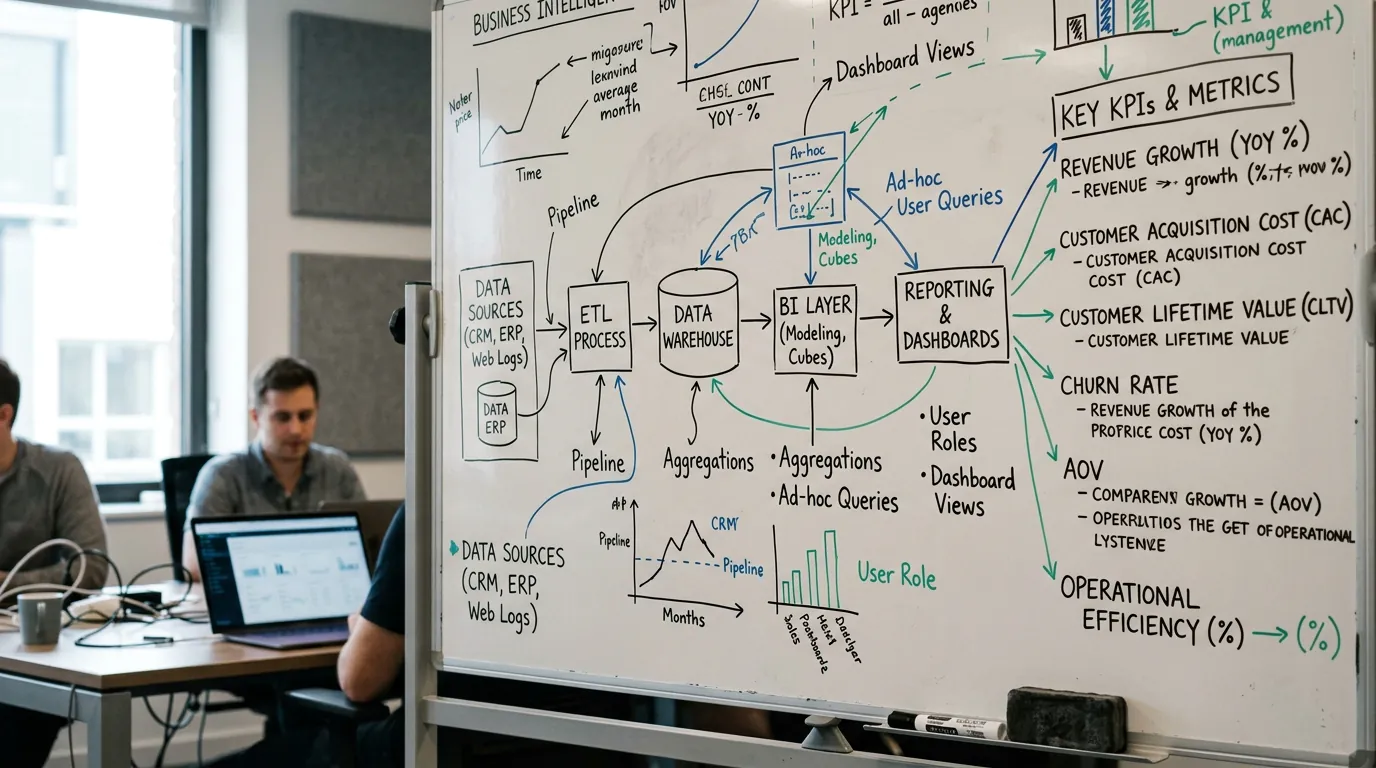
10 Hands-On BI Exercises with Sample Data
These 10 exercises progress from beginner to expert, covering the core skills every BI practitioner needs: dashboard design, KPI definition, segmentation, forecasting, supply chain tracking, financial automation, market basket analysis, churn prediction, real-time monitoring, and full strategy simulation. Each follows the same structure: Scenario → Dataset → Steps → Expected Output → Stretch Challenge.
Use this comparison table to find your starting point:
| # | Exercise | Difficulty | Primary Tool | Time Estimate | Key Skill |
|---|---|---|---|---|---|
| 1 | Sales Dashboard Creation | Beginner | Power BI / Excel | 2–3 hrs | Dashboard design |
| 2 | KPI Analysis & Anomaly Detection | Beginner | Excel / SQL | 2–3 hrs | KPI definition |
| 3 | Customer Segmentation (RFM) | Intermediate | SQL / Python | 3–4 hrs | Segmentation |
| 4 | Revenue Forecasting Model | Intermediate | Excel / Python | 4–5 hrs | Forecasting |
| 5 | Supply Chain Performance Tracking | Intermediate | Power BI / SQL | 3–4 hrs | Ops analytics |
| 6 | Financial Reporting Automation | Advanced | SQL / Power BI | 5–6 hrs | Finance BI |
| 7 | Market Basket Analysis | Advanced | Python / SQL | 4–5 hrs | Association rules |
| 8 | Churn Prediction Dashboard | Advanced | Python / Power BI | 5–6 hrs | Predictive BI |
| 9 | Real-Time Monitoring Setup | Expert | SQL / streaming | 6–8 hrs | Live data |
| 10 | Full BI Strategy Simulation | Expert | All tools | 8–10 hrs | Strategic BI |
Exercise 1 — Sales Dashboard Creation (Beginner)
Scenario: You are a junior analyst at a Rotterdam-based wholesale distributor with 12 sales reps. The sales director wants a single-page dashboard showing monthly revenue, top 10 customers by value, and regional performance. You have a flat CSV export from the ERP.
Dataset: Use Microsoft’s AdventureWorks sample data or create a CSV with columns: OrderDate, CustomerName, Region, ProductCategory, Revenue, Units.
Steps:
1. Load your CSV into Power BI Desktop (or Excel Power Query).
2. Create a Month-Year calculated column: FORMAT([OrderDate], "MMM YYYY").
3. Build a line chart: Month-Year on X-axis, sum of Revenue on Y-axis.
4. Add a bar chart: Top 10 CustomerName by Revenue (use Top N filter in the visual).
5. Add a map or matrix visual: Region vs. Revenue.
6. Add three KPI cards: Total Revenue, Total Units, Average Order Value.
7. Apply a date slicer so the sales director can filter by quarter.
Expected Output: A one-page dashboard where clicking a region filters all other visuals. Revenue trend visible at a glance. Top customers ranked without manual sorting.
Stretch Challenge: Add a target line to the revenue trend (e.g., 5% above prior year same month) and colour-code months that missed target in red.
Pro Tip: In Power BI, use the “Decomposition Tree” visual to let the sales director drill into why a region underperformed — without you having to build a separate report for every question.
Exercise 2 — KPI Analysis & Anomaly Detection (Beginner)
Scenario: A Utrecht-based SaaS company tracks five KPIs monthly: MRR, churn rate, CAC, LTV, and NPS. The CFO noticed revenue looked flat despite new customer growth. Your job: find the anomaly.
Dataset: Build a simple Excel table with 12 months of data. Include one deliberate anomaly — for example, a month where CAC doubled but new customers stayed flat (indicating a channel mix shift).
Steps:
1. In Excel, calculate month-over-month % change for each KPI: =(B2-B1)/B1.
2. Apply conditional formatting: red for negative MoM change, green for positive.
3. Create a combo chart: MRR as a bar, churn rate as a line on secondary axis.
4. Add a “flag” column: =IF(ABS(MoM_Change)>0.15,"ANOMALY","OK").
5. Build a pivot table summarising flagged months by KPI.
Expected Output: A flagged list of months where any KPI moved more than 15% MoM. The CFO can see immediately that Month 7 had a CAC spike — and the conversation shifts from “revenue looks flat” to “our paid search costs doubled.”
Stretch Challenge: Write a SQL version of the anomaly flag using a window function:
SELECT
  month,
  kpi_name,
  value,
  LAG(value) OVER (PARTITION BY kpi_name ORDER BY month) AS prev_value,
  ROUND((value - LAG(value) OVER (PARTITION BY kpi_name ORDER BY month))
        / NULLIF(LAG(value) OVER (PARTITION BY kpi_name ORDER BY month), 0) * 100, 1)
    AS mom_change_pct,
  CASE
    WHEN ABS((value - LAG(value) OVER (PARTITION BY kpi_name ORDER BY month))
             / NULLIF(LAG(value) OVER (PARTITION BY kpi_name ORDER BY month), 0)) > 0.15
    THEN 'ANOMALY'
    ELSE 'OK'
  END AS flag
FROM kpi_monthly
ORDER BY month, kpi_name;
Exercise 3 — Customer Segmentation with RFM (Intermediate)
Scenario: An Antwerp-based e-commerce retailer has 8,000 customers and a flat marketing budget. They want to stop sending the same newsletter to everyone and start targeting high-value segments. You will build an RFM model — Recency, Frequency, Monetary.
Dataset: Download the Online Retail dataset from UCI Machine Learning Repository — 541,909 transactions, freely available.
Steps:
1. In SQL or Python, calculate three metrics per customer:
– Recency: Days since last purchase (relative to max date in dataset)
– Frequency: Number of distinct orders
– Monetary: Total spend
SELECT
  CustomerID,
  DATEDIFF(day, MAX(InvoiceDate), '2011-12-10') AS recency,
  COUNT(DISTINCT InvoiceNo) AS frequency,
  ROUND(SUM(Quantity * UnitPrice), 2) AS monetary
FROM retail_transactions
WHERE CustomerID IS NOT NULL
GROUP BY CustomerID;
- Score each metric 1–5 using
NTILE(5)(5 = best). Note: for Recency, lower days = better, so reverse the scoring. - Concatenate scores into an RFM cell:
R_score || F_score || M_score(e.g., “555” = champion). - Map cells to segments: Champions (555, 554), Loyal (444–544), At Risk (211–311), Lost (111–211).
- Visualise segment sizes and average monetary value in Power BI or a Python bar chart.
Expected Output: A segmented customer table. Champions (typically 5–10% of customers) drive 30–40% of revenue. At-Risk customers are candidates for a win-back campaign.
Stretch Challenge: Calculate the revenue at risk if your At-Risk segment churns completely. Present this as a single number to the marketing director — that is the budget justification for a retention campaign.
Source: UCI Online Retail Dataset, illustrative segmentation
Exercise 4 — Revenue Forecasting Model (Intermediate)
Scenario: The CFO of a Ghent manufacturing company (€28M annual revenue) needs a 12-month revenue forecast for the board presentation. Historical monthly revenue is available for 36 months.
Dataset: Generate 36 months of synthetic revenue data with a trend component (+2% MoM average) and seasonality (Q4 peaks 20% above baseline).
Steps:
1. In Excel, plot historical revenue as a line chart.
2. Apply a 3-month moving average to smooth noise: =AVERAGE(B2:B4).
3. Use Excel’s FORECAST.ETS function for exponential smoothing with seasonality:
=FORECAST.ETS(target_date, values, timeline, seasonality=12).
4. Build a confidence interval: =FORECAST.ETS.CONFINT(target_date, values, timeline, 0.95).
5. In Python (optional), replicate with statsmodels:
from statsmodels.tsa.holtwinters import ExponentialSmoothing
import pandas as pd

model = ExponentialSmoothing(
    revenue_series,
    trend='add',
    seasonal='add',
    seasonal_periods=12
).fit()

forecast = model.forecast(12)
print(forecast)
- Present three scenarios: Base (ETS), Optimistic (+10%), Conservative (-10%).
Expected Output: A 12-month forecast table with confidence bands. The board sees a range, not a single number — which is more honest and more defensible.
Stretch Challenge: Add a “what-if” slider in Excel (using a data table) that adjusts the growth assumption from -5% to +15% and recalculates the 12-month total automatically.
Exercise 5 — Supply Chain Performance Tracking (Intermediate)
Scenario: A logistics company with 200 employees in Breda tracks 15 KPIs across three warehouses. The operations director wants a single dashboard showing on-time delivery rate, fill rate, and inventory turnover — updated daily from a SQL database.
Dataset: Use the Northwind database — freely available, includes orders, shipments, products, and suppliers.
Steps:
1. Write SQL queries for each KPI:
-- On-Time Delivery Rate
SELECT
  YEAR(ShippedDate) AS yr,
  MONTH(ShippedDate) AS mo,
  COUNT(*) AS total_orders,
  SUM(CASE WHEN ShippedDate <= RequiredDate THEN 1 ELSE 0 END) AS on_time,
  ROUND(100.0 * SUM(CASE WHEN ShippedDate <= RequiredDate THEN 1 ELSE 0 END)
        / COUNT(*), 1) AS otd_rate_pct
FROM Orders
WHERE ShippedDate IS NOT NULL
GROUP BY YEAR(ShippedDate), MONTH(ShippedDate);
- Connect Power BI directly to your SQL database (DirectQuery mode for “live” refresh).
- Build a traffic-light matrix: each warehouse × each KPI, coloured by threshold (green/amber/red).
- Add a trend sparkline for each KPI using Power BI’s built-in sparkline feature.
- Set a daily scheduled refresh in Power BI Service.
Expected Output: The operations director opens one URL every morning and sees which warehouse needs attention — without asking anyone for a report.
For deeper context on how supply chain BI fits into a broader operational strategy, the Supply Chain 4.0 guide covers the automation layer that sits on top of this kind of tracking.

Exercise 6 — Financial Reporting Automation (Advanced)
Scenario: The finance team at a Brussels-based professional services firm spends 3 days every month manually building a P&L report in Excel. You will automate it using SQL + Power BI, reducing that to 20 minutes.
Dataset: Create a gl_transactions table with columns: posting_date, account_code, account_name, department, debit, credit, cost_centre.
Steps:
1. Build a SQL view that calculates P&L by account group:
CREATE VIEW vw_pl_monthly AS
SELECT
  FORMAT(posting_date, 'yyyy-MM') AS period,
  account_group,
  department,
  SUM(credit - debit) AS net_amount
FROM gl_transactions
JOIN chart_of_accounts ON gl_transactions.account_code = chart_of_accounts.account_code
GROUP BY FORMAT(posting_date, 'yyyy-MM'), account_group, department;
- Connect Power BI to this view.
- Build a matrix visual: rows = account groups (Revenue, COGS, Gross Profit, OpEx, EBITDA), columns = months.
- Add variance columns: Actual vs. Budget, Actual vs. Prior Year.
- Add a reconciliation check: total revenue in the BI report must match the GL system total. Build this as a card visual with a conditional alert (red if variance > €1,000).
Expected Output: A live P&L report that refreshes automatically. The finance team’s 3-day manual process becomes a 20-minute review.
Stretch Challenge: Add a department drill-through page so the CFO can click any cost line and see the underlying transactions — with a “back” button to return to the summary.
Exercise 7 — Market Basket Analysis (Advanced)
Scenario: A Dutch online retailer wants to improve cross-sell recommendations. Which products are bought together most often? You will use the Apriori algorithm to find association rules.
Dataset: The UCI Online Retail dataset from Exercise 3 works perfectly here.
Steps:
1. Install the mlxtend library in Python: pip install mlxtend.
2. Pivot the transaction data into a basket matrix (rows = invoices, columns = products, values = 1/0):
import pandas as pd
from mlxtend.frequent_patterns import apriori, association_rules

basket = df.groupby(['InvoiceNo', 'Description'])['Quantity'].sum().unstack().fillna(0)
basket = basket.applymap(lambda x: 1 if x > 0 else 0)

frequent_items = apriori(basket, min_support=0.02, use_colnames=True)
rules = association_rules(frequent_items, metric='lift', min_threshold=1.5)
rules = rules.sort_values('lift', ascending=False)
print(rules[['antecedents','consequents','support','confidence','lift']].head(20))
- Interpret the top rules: a lift > 2 means customers who buy Product A are twice as likely to buy Product B compared to random chance.
- Visualise the top 10 rules as a bubble chart in Power BI: X = support, Y = confidence, bubble size = lift.
Expected Output: A ranked list of product pairs with lift scores. The e-commerce team uses this to configure “frequently bought together” recommendations — no machine learning vendor required.
Exercise 8 — Churn Prediction Dashboard (Advanced)
Scenario: A telecom reseller in Eindhoven loses 8% of customers annually. The commercial director wants to know which customers are likely to churn in the next 90 days — before they actually leave.
Dataset: Use the IBM Telco Customer Churn dataset from Kaggle — 7,043 customers, freely available.
Steps:
1. In Python, train a logistic regression model:
from sklearn.linear_model import LogisticRegression
from sklearn.model_selection import train_test_split
from sklearn.preprocessing import LabelEncoder
import pandas as pd

df = pd.read_csv('telco_churn.csv')
df['Churn'] = df['Churn'].map({'Yes': 1, 'No': 0})

# Encode categoricals
for col in df.select_dtypes('object').columns:
    df[col] = LabelEncoder().fit_transform(df[col].astype(str))

X = df.drop(['customerID', 'Churn'], axis=1)
y = df['Churn']
X_train, X_test, y_train, y_test = train_test_split(X, y, test_size=0.2)

model = LogisticRegression(max_iter=1000)
model.fit(X_train, y_train)
df['churn_probability'] = model.predict_proba(X)[:, 1]
- Export the scored customer table to CSV.
- Load into Power BI and build a dashboard: churn probability distribution, top 50 at-risk customers by revenue, and key churn drivers (feature importances visualised as a bar chart).
- Add a “risk tier” column: High (>70%), Medium (40–70%), Low (<40%).
Expected Output: The commercial team has a weekly action list — 50 customers to call, ranked by revenue at risk. Not a model. An action list.
Exercise 9 — Real-Time Monitoring Setup (Expert)
Scenario: A manufacturing plant in Tilburg monitors 200 sensors on the production line. Downtime costs €4,000 per hour. You will build a real-time monitoring dashboard that alerts when any sensor reading exceeds threshold.
Dataset: Use Python to simulate streaming sensor data, or connect to a free MQTT broker with sample IoT data.
Steps:
1. Simulate a streaming data source in Python:
import time, random, json
sensors = ['temp_01','pressure_02','vibration_03']
while True:
    reading = {
        'timestamp': pd.Timestamp.now().isoformat(),
        'sensor': random.choice(sensors),
        'value': random.gauss(50, 10)
    }
    print(json.dumps(reading))
    time.sleep(1)
- Push data to Azure Event Hub or a PostgreSQL table with a timestamp index.
- Connect Power BI to the streaming dataset (Power BI Streaming Dataset API).
- Build a real-time line chart that updates every 5 seconds.
- Configure a Power BI alert: if any sensor value exceeds 70, send an email to the plant manager.
Expected Output: A live dashboard visible on a screen in the plant. When a sensor spikes, an alert fires within 30 seconds — before the line goes down.
Stretch Challenge: Add a 5-minute rolling average to distinguish genuine anomalies from random noise. A single spike is noise. Three consecutive readings above threshold is a signal.
Exercise 10 — Full BI Strategy Simulation (Expert)
Scenario: You are the newly hired Head of Analytics at a €45M Dutch distribution company. The board wants a BI roadmap for the next 18 months. You have 90 minutes to present your plan.
This is not a technical exercise. It is a strategic one.
Steps:
1. Define the board questions. Write five questions the board actually asks: Which customers are margin-negative? Where are we losing to competitors? What does our cash position look like in 90 days?
2. Map data assets. Inventory what exists: ERP (SAP B1), CRM (Salesforce), spreadsheets. Rate each source: complete, partial, or missing.
3. Prioritise use cases. Score each board question on two axes: business impact (1–5) and data readiness (1–5). Plot on a 2×2 matrix. Top-right quadrant = start here.
4. Define the KPI contract. For your top-priority use case, write a formal KPI definition:
– Metric: Gross Margin per Customer
– Numerator: Revenue minus COGS (per customer, per period)
– Denominator: Revenue (per customer, per period)
– Grain: Customer × Month
– Exclusions: Internal transfers, credit notes > 90 days old
– Reconciliation check: Sum of all customer margins must equal company-level gross margin in the P&L
5. Build a 3-phase roadmap: Foundation (months 1–3: data quality, one live dashboard), Insight (months 4–9: forecasting, segmentation), Intelligence (months 10–18: predictive models, automated alerts).
6. Present to the “board.” Have a colleague play CFO and challenge every assumption.
Expected Output: A one-page BI roadmap with prioritised use cases, KPI definitions, and a phased delivery plan. This is the deliverable a BI consultancy produces in week one of an engagement.
What we consistently see in Benelux implementations: companies that define KPI contracts before building dashboards reduce rework by more than half. The discipline of writing a numerator and denominator forces conversations that would otherwise surface six months later — when the CFO asks why the BI number doesn’t match the finance number.
If your organisation is at this stage — mapping data assets and prioritising use cases — the Data Foundation solution describes how we structure that groundwork with clients.

How to Structure Your BI Learning Path
22.7% of Dutch enterprises with 10 or more employees used AI in 2024 — up from 14% the year before, according to CBS. That adoption gap creates a skills gap. The organisations closing it fastest are not the ones buying more tools. They are the ones building internal analytical muscle through deliberate practice.
Here is how to structure that practice.
Beginner → Intermediate → Advanced Progression
| Level | Exercises | Gate Criteria |
|---|---|---|
| Beginner | 1–2 | Can build a filtered dashboard; can define and flag a KPI anomaly |
| Intermediate | 3–5 | Can write SQL joins; can segment customers; can produce a forecast with confidence intervals |
| Advanced | 6–8 | Can automate a financial report; can run a Python ML model; can interpret association rules |
| Expert | 9–10 | Can design a live monitoring system; can present a BI strategy to a board |
Don’t rush the gates. Finishing Exercise 3 without being able to explain your RFM scoring logic to a non-technical manager means you are not ready for Exercise 4.
Recommended Tools for Each Level
| Level | Recommended Tools | Why |
|---|---|---|
| Beginner | Excel, Power BI Desktop | Low friction, visual feedback, no coding required |
| Intermediate | SQL (PostgreSQL or SQL Server), Power BI | Joins and aggregations are the core of BI; Power BI connects directly |
| Advanced | Python (pandas, scikit-learn, mlxtend), Power BI | ML models require code; Power BI visualises the outputs |
| Expert | All of the above + Azure / AWS streaming | Real-time and strategic work requires infrastructure awareness |
If you use Power BI, start with Exercise 1. If your primary tool is SQL, start with Exercise 2. If you work in Python, jump to Exercise 3 and use the SQL steps as reference.
Self-Assessment Checklist
Before moving to the next level, confirm you can do all of the following without looking up syntax:
Beginner:
– [ ] Connect a CSV to Power BI and build a date hierarchy
– [ ] Apply a Top N filter to a bar chart
– [ ] Define a KPI with numerator, denominator, and time window
– [ ] Write a conditional formula in Excel (IF, AVERAGEIF)
Intermediate:
– [ ] Write a SQL query with GROUP BY, HAVING, and a window function (LAG, NTILE)
– [ ] Build an RFM model from a transactions table
– [ ] Produce a 12-month forecast with confidence intervals
– [ ] Connect Power BI to a live SQL database
Advanced:
– [ ] Build a SQL view that automates a P&L calculation
– [ ] Run an Apriori association rules model in Python
– [ ] Train and score a logistic regression churn model
– [ ] Interpret model outputs for a non-technical audience
Expert:
– [ ] Design a streaming data pipeline
– [ ] Write a formal KPI contract with reconciliation check
– [ ] Prioritise BI use cases using an impact × readiness matrix
– [ ] Present an 18-month BI roadmap to a board
The Scenario-to-Signal Framework
Most BI projects fail not because of bad tools but because of bad questions. The Scenario-to-Signal framework is a five-step structure that ensures every exercise — and every real client engagement — starts with a decision, not a dataset.
Source: Industry estimates, directional figures
Here is what operational experience shows: organisations that skip Step 1 (Board Question First) consistently build dashboards that answer questions nobody asked. The dashboard looks impressive. Nobody uses it.
Step 1 — Board Question First. Write the executive question in one sentence: Which customers are driving margin erosion and why? Define the decision it enables: Prioritise the top 20 accounts for a pricing review.
Step 2 — Metric Contract. Define 3–7 KPIs with strict numerator/denominator definitions, analytical grain, time window, and exclusions. Add one reconciliation check to a finance source of truth.
Step 3 — Data-to-Grain Mapping. Inventory your datasets. Choose the analytical grain (order-line, day, customer). Write a join plan. Run key integrity checks: duplicates, missing foreign keys, one-to-many traps.
Step 4 — Insight Pattern Build. Apply one of five patterns: Trend, Variance-to-Plan, Segment, Funnel, or Forecast/What-if. Validate with sensitivity checks — change a filter, change a time window, remove the top outlier. Does the insight hold?
Step 5 — Decision & Action Loop. Convert outputs into an Action Memo: owner, action, expected € impact, confidence level, next data needed. Log what you learned. Use it in the next exercise iteration.
The pattern across our client engagements is clear: teams that document their KPI contracts in Step 2 spend significantly less time in rework during the delivery phase. The discipline is uncomfortable at first. It pays for itself by the second sprint.
For teams ready to move from exercises to live implementation, the Commercial Intelligence solution covers how we apply this framework to sales and customer analytics for Benelux SMEs. And if you want to understand what the full delivery journey looks like, the Data-to-Done Framework maps the seven phases from problem definition to production.
Ready to apply these exercises to a real business problem? Book a free introductory meeting and walk us through your current data situation — we’ll tell you which exercises map to your most pressing board questions.
We have guided BI implementations across manufacturing, logistics, professional services, and retail in the Benelux. Our diagnostic process starts with the same Step 1 question you practiced in Exercise 10: what decision does this data need to enable?

Key Takeaways
- Start with the board question, not the dataset. Every exercise in this guide opens with a business scenario because the question determines the metric, the grain, and the tool — not the other way around.
- The Beginner → Expert progression is a gate system, not a timeline. Moving to RFM segmentation before you can write a SQL
GROUP BYproduces models you cannot explain or defend. - 22.7% of Dutch enterprises used AI in 2024, up from 14% in 2023 (CBS) — the organisations building analytical skills now are positioning themselves ahead of the adoption curve, not chasing it.
- A KPI contract (numerator, denominator, grain, exclusions, reconciliation check) prevents the single most common BI failure: the CFO’s number and the dashboard number don’t match.
- Exercises 7, 8, and 9 require Python. If you are not there yet, that is the clearest signal of where to invest your next 30 hours of learning time.
Frequently Asked Questions
What are business intelligence exercises?
Business intelligence exercises are structured, scenario-based practice problems that train analysts and managers to transform raw data into business decisions. They cover dashboard creation, KPI analysis, customer segmentation, forecasting, and strategic BI planning. Practicing them builds the judgment that tools alone cannot teach.
What is the best BI exercise for beginners?
The best starting exercise for beginners is a sales dashboard creation using Excel or Power BI Desktop with a sample CSV dataset. It teaches data loading, calculated columns, visual design, and filtering — the four foundations of every BI deliverable — in 2–3 hours without requiring any coding.
How do I practice business intelligence skills without real company data?
Use freely available datasets: the UCI Online Retail dataset (541,909 transactions), the Microsoft Northwind database (orders, products, suppliers), the IBM Telco Churn dataset (7,043 customers), and Microsoft’s AdventureWorks Power BI sample files. All are structured around realistic business scenarios.
What SQL skills do I need for BI exercises?
For intermediate BI exercises, you need SELECT, GROUP BY, HAVING, JOIN (inner and left), and window functions (LAG, LEAD, NTILE, ROW_NUMBER). Advanced exercises add CREATE VIEW, CTEs (WITH), and subqueries. Practice these in PostgreSQL or SQL Server — both have free versions.
How long does it take to complete all 10 BI exercises?
Working through all 10 exercises takes approximately 40–50 hours of focused practice. Beginners should expect to spend more time on Exercises 1–2 (understanding the tools) and Exercises 9–10 (understanding the architecture). Spread across 8–10 weeks, that is a realistic upskilling timeline for someone with a full-time role.
What is RFM analysis and why is it a BI exercise?
RFM stands for Recency, Frequency, Monetary. It is a customer segmentation technique that scores each customer on how recently they bought, how often they buy, and how much they spend. It is a core BI exercise because it requires SQL aggregation, scoring logic, and a business-facing output (segment-based marketing actions) — all in one problem.
Can these BI exercises be used for team training?
Yes. Exercises 1–5 work well as structured team workshops of 3–4 hours each. Exercise 10 (Full BI Strategy Simulation) is particularly effective as a team exercise: split into groups, assign the “board” role to a senior manager, and have each group present their BI roadmap. The debrief surfaces KPI disagreements that would otherwise take months to discover in a live project.
Related Articles
- The Data-to-Done Framework: 7 Phases of Custom AI Development — understand the full delivery journey from business problem to production system
- Supply Chain 4.0: The Future of Automated Chains — how BI and automation combine in Benelux logistics and distribution
- Five Signs You Have Outgrown Off-the-Shelf AI — signals that your BI practice has matured to the point where generic tools create bottlenecks
- The AI Paradox: Why Most AI Investments Fail — what separates organisations that scale BI from those stuck in pilot mode
Sources
- Increasing use of AI by business — CBS (Centraal Bureau voor de Statistiek), September 2025
- ICT usage in Enterprises — CBS, 2024
- ICT and e-commerce in enterprises — Statbel (Belgian Statistical Office), 2024
- ICT usage in enterprises — European Commission (Netherlands) — Eurostat, 2024
- ICT usage in enterprises — European Commission (Belgium) — Eurostat, 2024
- Quality report on European statistics on ICT usage and e-commerce — Eurostat, 2026
- Digital Consumer Trends 2024 — Deloitte Belgium, November 2024
- FY24 Annual Results — Deloitte Belgium, January 2024
- Integrated Annual Report 2024/2025 — Deloitte Netherlands, 2024–2025
- Gartner identifies top trends in data and analytics for 2025 — Digitalisation World (citing Gartner), 2025
- Gartner’s top D&A predictions for 2025 — DataGalaxy (citing Gartner), July 2024
- Augmented Analytics Market Size and Share 2025–2030 — Next Move Strategy Consulting, 2024
- Everything-as-a-service business models — Deloitte Belgium