





In business intelligence, data visualization is the last step between a correct number and a decision: the warehouse can be right and the chart can still leave the reader with the wrong impression. There is a large research literature on how accurately people read charts, and much of it does not reach the people building business dashboards. What reaches them instead is a set of design rules: some of which the research supports, some of which it contradicts, and some of which are folk wisdom with a confident tone.
This guide is about the encoding decisions: which visual channels people decode accurately, which ones distort measurably and by how much, and where the widely repeated advice goes further than the evidence. It is written for the people who build and review BI reports, and it includes a one-page chart standard you can adapt. It is deliberately narrow. For dashboard layout, department examples and tool comparison, our dashboard guide covers that ground.
In short: show values by position on a common scale, start bar axes at zero, never let color carry meaning on its own, and avoid area and 3D encodings where readers have to compare values. The one-page chart standard further down turns this into defaults you can adapt.
On this page
- Which encodings do people read accurately?
- How much does a truncated axis actually distort?
- Why circles and 3D mislead
- What the colour-vision numbers actually are
- Which contrast rule applies to charts?
- Is the rainbow colour map really that bad?
- Rules the research does not support
- Turning this into a house standard
- Frequently asked questions
Key Takeaways
- Cleveland and McGill’s 1984 ordering of encodings puts position first and contains three sets of ties. A 2010 crowdsourced replication confirmed that position beats length, angle and area, but found no evidence that angle is worse than length.
- Truncating a bar chart’s y-axis produced a truncation effect in 83.5% of participants across five studies (Cohen’s d 0.48 to 1.26). Explaining the trick reduced the effect but did not remove it, and in separate experiments break marks and gradients did not significantly reduce it.
- Red-green color deficiency affects about 8% of men and 0.4% of women of European ancestry, and 4–6.5% of men of Chinese or Japanese ancestry. It is not a single global constant.
- Under WCAG 2.1 and 2.2, chart elements that a reader relies on to understand the chart, such as bars, lines and legend swatches, need a 3:1 contrast ratio against adjacent colors; the 4.5:1 minimum applies to text.
- In a 21-person study, participants using a diverging color map found about 47% more of the target regions in 2D artery images than those using a rainbow map. A 544-person map study found rainbow competitive for reading specific values but worse for tasks that require ordering colors.
Which encodings do people read accurately?
The foundational work is Cleveland and McGill’s 1984 paper, which measured how accurately people judge quantities presented through different visual channels. Their ordering, most to least accurate:
| Rank | Encoding | Where it shows up in BI visuals |
|---|---|---|
| 1 | Position along a common scale | Bars on a shared baseline, dot plots, lines on one axis |
| 2 | Position along non-aligned scales | Small multiples or panels, each with its own baseline |
| 3 (tied) | Length, direction and angle | Bars without a common baseline, slopes, pie slice angles |
| 4 | Area | Bubble sizes, treemap tiles |
| 5 (tied) | Volume and curvature | 3D columns, curved or ribbon shapes |
| 6 (tied) | Shading and color saturation | Heatmaps, shaded maps |
Two details of the original are usually lost. First, the authors call it a hypothesised ordering, drawn from “a variety of sources”: their own reasoning and experiments, earlier psychophysical experiments and theory. Their own tests compared position, length and angle directly: length errors were 40% to 250% larger than position errors, and angle errors about twice as large. Second, three of the six ranks are ties, and the authors say there was “not enough information to separate the ties”.
Heer and Bostock repeated the core experiments in 2010 on Amazon Mechanical Turk, with 50 subjects per chart across seven judgment types. The ranking of the position and length judgments matched the original, though the two position conditions sat closer together. Area did worse than angle, and both did significantly worse than position. But angle did not do worse than length, as the theory predicts.
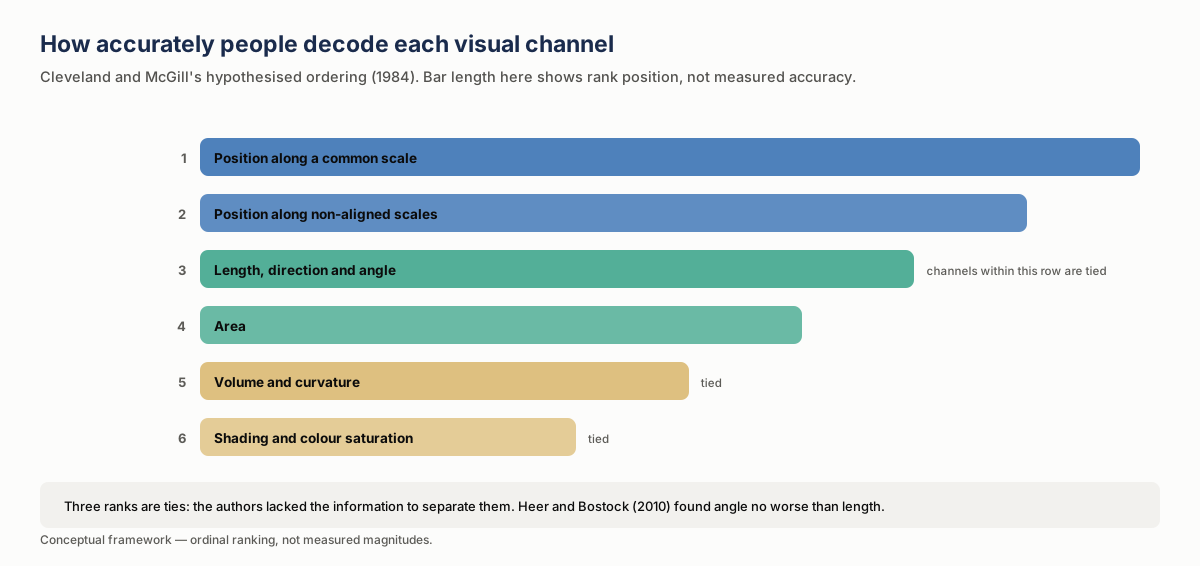
The practical consequence for BI is unexciting and reliable: a bar chart with a common baseline, or a dot plot on a common scale, is the most accurately read way to compare quantities, and much dashboard sophistication moves down this list rather than up it. A donut instead of a bar trades position for angle. A treemap trades it for area. A heatmap trades it for color saturation, which sits in the lowest rank on the list for judging magnitudes.
That is not an argument against ever using them: a treemap shows hierarchy, and a heatmap lets a reader scan a dense grid for patterns and exceptions that plain bars could not hold. It is an argument for knowing what you are trading, and for not making that trade on a chart whose entire purpose is accurate comparison.
How much does a truncated axis actually distort?
The distortion from a truncated axis has an unusually precise answer, and the answer includes bad news about the standard fix.
Yang, Vargas Restrepo, Stanley and Marsh ran five studies on truncated bar graphs. 83.5% of participants across the five studies showed a truncation effect, with Cohen’s d between 0.48 and 1.26. Study 1 found a large effect (1.26); the other four were close to the conventional threshold for a medium effect, at 0.48 to 0.54. Two further findings matter more than the headline. Teaching participants how truncation misleads reduced the effect but did not eliminate it, and graph literacy did not significantly predict how strongly people were misled.
Correll, Bertini and Franconeri’s separate crowdsourced experiments found that the more the axis was truncated, the larger the effect viewers perceived. Participants’ trend estimates were no less accurate at higher truncation, and the authors concluded that accurate estimation of values “does not seem to counteract the visual magnification of difference”. The part that matters for practice: designs that explicitly signal truncation, including break marks and gradients, did not produce a significant difference in perceived severity.
| Study | What was tested | Main finding | What it says about fixes |
|---|---|---|---|
| Yang et al. | Five studies on truncated bar graphs | 83.5% of participants showed a truncation effect; Cohen’s d 0.48 to 1.26 (study 1: 1.26; the other four: 0.48 to 0.54) | Teaching how truncation misleads reduced the effect but did not eliminate it; graph literacy did not significantly predict how strongly people were misled |
| Correll, Bertini and Franconeri | Crowdsourced experiments with varying amounts of axis truncation | The more the axis was truncated, the larger the effect viewers perceived; trend estimates were no less accurate at higher truncation | Break marks and gradients did not produce a significant difference in perceived severity |
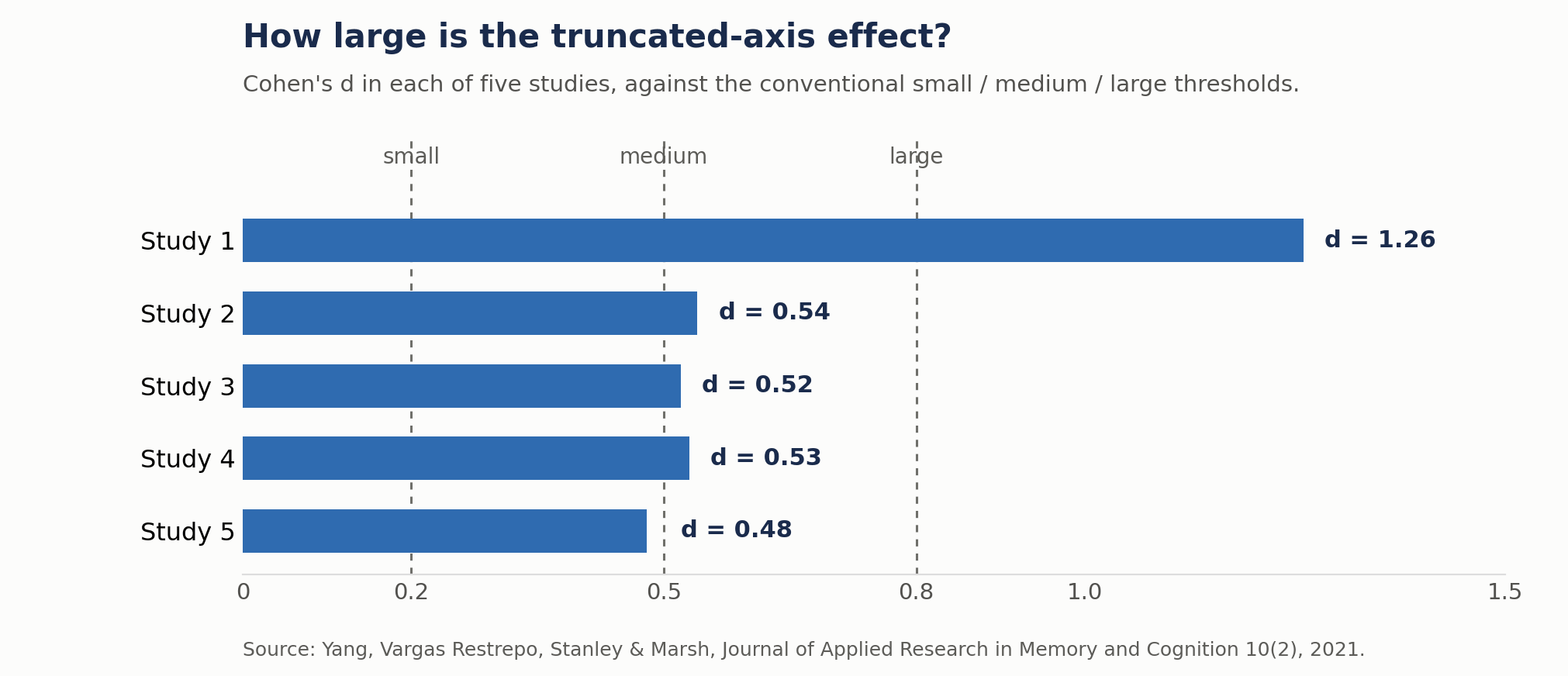
So the workable rule is narrower than “never truncate”, but not as loose as “lines are fine”. Bar charts encode by length from the baseline, so truncating the axis breaks the encoding and should not be done. Range or floating bars, such as a Gantt chart, encode start and end points instead and are a separate case. Correll and colleagues found no significant difference in the exaggeration between line charts and bar charts. But a line chart encodes by position, where a zero baseline is sometimes uninformative: a share price or a temperature series does not need one. Their advice is to choose the axis range to match the size of difference that is meaningful for the data, knowing that readers will take the visual size of the change at face value.
What the evidence does rule out is truncating a bar chart and adding a break mark to make it honest.
Why circles and 3D mislead
Area sits fourth in the ordering, and the way it fails is systematic rather than random.
The apparent size of discs is commonly described by a power function with an exponent close to 0.70 or even less, as Raidvee and colleagues summarize from classic psychophysics: perceived size grows more slowly than area. Cartographic research going back to Flannery’s 1956 dissertation found the same underestimation: his size-estimation tests, each with about 1,000 students, gave exponents of 0.87 and 0.86, and he derived a correction for drawing circle radii from them.
The practical effect: if you scale a circle so its area is proportional to the value, readers will systematically underestimate the larger values. If you scale the radius instead, a common implementation shortcut, you overstate them dramatically, because area grows with the square of radius. A value four times larger gets a circle sixteen times the area.
In Raidvee’s experiments, judgments of the total area covered by several circles were more than eleven times less accurate in absolute terms than judgments of their mean diameter, and about three times less accurate in relative terms. Bubble charts that ask a reader to compare aggregate area are asking for something people do poorly.
Three-dimensional rendering compounds this. Siegrist compared 2D and 3D pie and bar charts in 1996. Pie charts were read better in 2D. For bar charts the picture was mixed (accuracy depended on the position, height and dimension of the bars), but participants needed more time to read the 3D bars. In a bar or pie chart, depth adds perspective and occlusion without adding any data. Scientific 3D views, where the spatial structure is itself the information, are a separate question.
What the color-vision numbers actually are
The figure most often quoted is “8%” or “1 in 12”. The literature is more specific, and the specifics matter for a global audience.
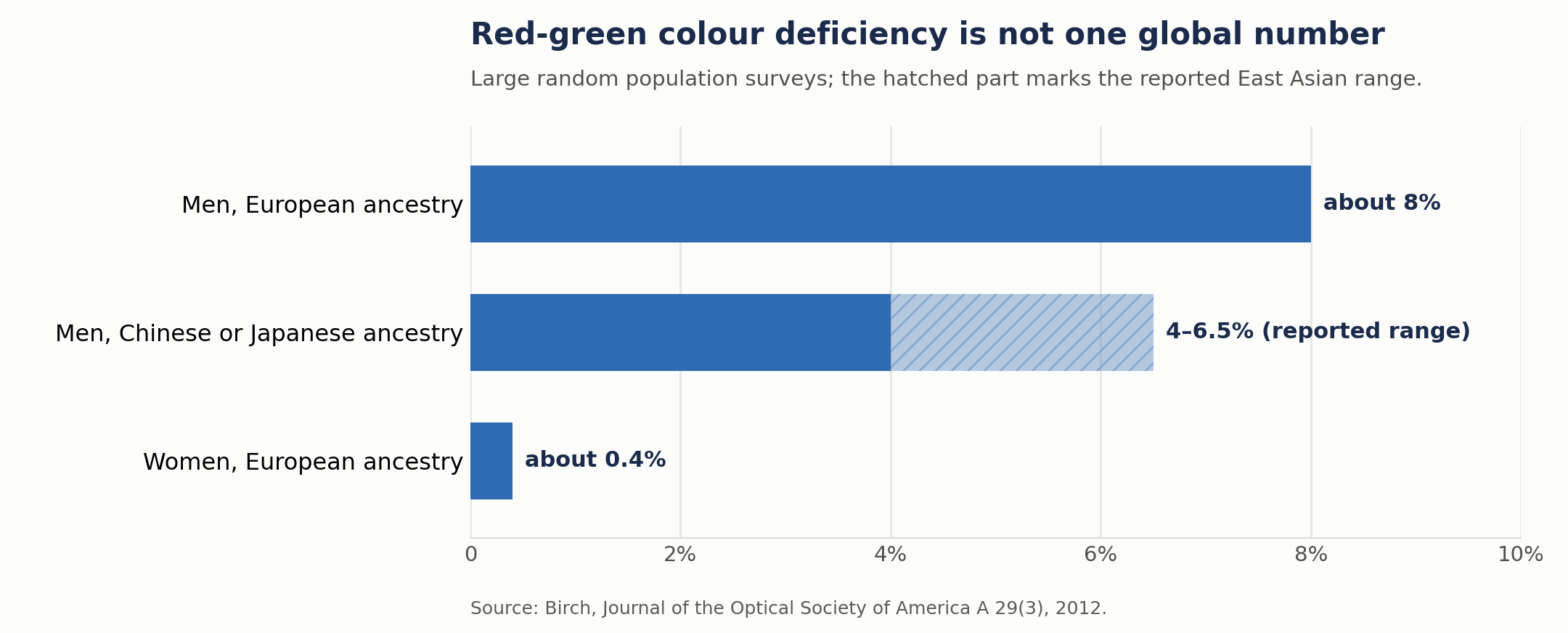
Birch’s 2012 review of large random population surveys puts inherited red-green color deficiency at about 8% of men and 0.4% of women of European ancestry, and between 4% and 6.5% of men of Chinese and Japanese ethnicity. The review also notes that the ratio between men and women differs markedly between Europeans and Asians. Simunovic’s clinical review gives “as many as 8% of males and 0.5% of females” for congenital deficiency. School surveys cited in a 2025 review found 2.2% of boys in Durban, South Africa, and 4.7% of boys in the Republic of Ireland; they used different samples and tests, so they show spread rather than a ranking.
Birch proposes that founder events and genetic drift, rather than natural selection, explain the differences.
Two practical implications. First, “design for 8%” is the right order of magnitude for an audience of mostly European ancestry, and somewhat high for an East Asian one, where the reported range is roughly half to four-fifths of that. Second, and more useful: the variation does not change the design rule. Color should not be the only channel carrying information, for any audience, at any prevalence. Pair it with position, shape, direct labeling or ordering, and the prevalence question stops mattering.
Which contrast rule applies to charts?
The accessibility guidelines contain two separate contrast requirements, and it is easy to apply the wrong one to a chart. The criteria below are quoted from WCAG 2.1; WCAG 2.2 keeps them with the same wording.
Success criterion 1.4.3, at level AA, requires text and images of text to have a contrast ratio of at least 4.5:1, relaxing to 3:1 for large text.
Success criterion 1.4.11, added in WCAG 2.1 at level AA, covers user interface components and graphical objects (“parts of graphics required to understand the content”) and requires 3:1 against adjacent colors.
Chart elements are graphical objects. A bar, a line, a plotted point or a legend swatch that the reader relies on to understand the chart needs 3:1 against the colors next to it, not 4.5:1. The W3C’s explanatory notes add that a graphic is not required for understanding when the same information is printed on it as text, such as labels and values, or is available in another form, such as a table that follows the chart. The axis labels and data labels are themselves text, and fall under the 4.5:1 requirement (3:1 if large).
Conflating these produces two failure modes in opposite directions: designers who apply 4.5:1 to every series color end up with an unnecessarily dark and limited palette, and designers who apply nothing at all ship a light-gray series on a white background that disappears on a projector.
A third criterion, 1.4.1 Use of Color at level A, is arguably the most consequential for charts and often overlooked: color must not be the only visual means of conveying information. A red-versus-green variance indicator with no other differentiator fails this outright, whatever its contrast ratio.
| Criterion | Level | What it covers | What it requires |
|---|---|---|---|
| 1.4.3 Contrast (Minimum) | AA | Text and images of text, including axis labels and data labels | 4.5:1, or 3:1 for large text |
| 1.4.11 Non-text Contrast | AA (added in WCAG 2.1) | Graphical objects, “parts of graphics required to understand the content”: bars, lines, plotted points, legend swatches | 3:1 against adjacent colors |
| 1.4.1 Use of Color | A | Color as the only visual means of conveying information | Color must not be the only channel, whatever the contrast ratio |
Is the rainbow color map really that bad?
Mostly yes, but the research is more precise than the blanket ban.
The standard objection, set out in Borland and Taylor’s 2007 critique and repeated in the studies that followed it, is that the rainbow map is not perceptually ordered, that its brightness does not rise steadily with the data, and that it can create apparent boundaries that come from the color map rather than the data. Put simply, equal steps in the data do not produce equal visual steps, so the same numeric interval can look larger in some parts of the range than in others.
The task cost has been measured. Borkin and colleagues tested 21 Harvard medical students on artery images. In 2D, participants using a red-to-black diverging color map found about 47% more regions of low endothelial shear stress than those using a rainbow map. In 3D, the diverging map gave an improvement of about 82%, and participants found each region roughly twice as fast with it; in 2D, the time per region found did not differ significantly.
But a 2022 study of rainbow and sequential schemes on maps by Gołębiowska and Çöltekin, with 544 participants, found that rainbow colors were competitive for extracting specific values and may support hue recall better. Sequential schemes supported most quantitative map-reading tasks better, and the rainbow scheme clearly harmed tasks that require ordering colors. The harm is task-dependent. If the reader’s job is to order or compare magnitudes, which is what a BI heatmap is usually for, the evidence points against rainbow. If the job is to read off a specific value, the picture is less one-sided. The same authors add that rainbow is not appropriate for people with color-vision deficiency, whatever the task.
| Study | Participants | Task | Finding |
|---|---|---|---|
| Borkin and colleagues, 2D artery images | 21 Harvard medical students | Find regions of low endothelial shear stress | Red-to-black diverging map: about 47% more regions found than with rainbow; time per region did not differ significantly |
| Borkin and colleagues, 3D artery images | Same 21 students | Same task | Diverging map: about 82% improvement, and each region found roughly twice as fast |
| Gołębiowska and Çöltekin, 2022, maps | 544 participants | Map-reading tasks with rainbow and sequential schemes | Rainbow competitive for extracting specific values; sequential better for most quantitative tasks; rainbow clearly harmed tasks that require ordering colors |
For business intelligence, that resolves easily. Where a color scale is there to show higher and lower, a perceptually uniform sequential map is the right default. A diverging map works best when the data has a meaningful midpoint, such as zero, the mean or a target, which is the condition ColorBrewer’s guidance gives for diverging schemes.
Rules the research does not support
Five pieces of standard advice that the evidence contradicts or overstates:
| Common rule | What the research shows | Source |
|---|---|---|
| “Add a break mark and a truncated axis is fine” | In the experiments that tested them, break marks and gradients did not significantly reduce the perceived exaggeration | Correll et al., 2020 |
| “Misleading charts are mostly a design problem, such as dual or truncated axes” | In 9,958 COVID-19 posts on Twitter, design violations appeared in 12% of posts, at similar rates in posts with and without reasoning errors; misleading posts mostly relied on well-built charts and flawed reasoning | Lisnic et al., 2023 |
| “Never use a rainbow colour map” | The disadvantage concentrates in ordering and magnitude tasks; rainbow was competitive for reading specific values | Gołębiowska & Çöltekin, 2022 |
| “8% of any audience is colour blind” | That is men of European ancestry; 4–6.5% in men of Chinese or Japanese ancestry, and about 0.4% in women of European ancestry | Birch, 2012 |
| “Chart elements need 4.5:1 contrast” | Graphical objects needed to understand the chart fall under a 3:1 requirement; 4.5:1 applies to text | WCAG 2.1, SC 1.4.11 |
The misleading-chart finding is counterintuitive. In the sample of Lisnic and colleagues, dual axes were the most common design violation, at 5.4% of all posts. Misleading posts mostly worked through reasoning: cherry-picked data, arbitrary thresholds, unsupported causal claims, and captions that gave meaning to an unexplained feature of a correctly built chart. That is one domain and one platform, but it is a useful corrective for anyone who believes a design review catches misleading reporting. It mostly catches design.
Turning this into a house standard
The findings above only help if they survive the next person who builds a chart, which means writing them down as defaults rather than principles. The one-page version below covers only what the evidence in this article supports; layout, naming and refresh rules are yours to add.
| Decision | Default | Allowed exception | Check before publishing |
|---|---|---|---|
| Comparing values | Bars on a common baseline, or dots on a common scale | A pie for a rough two- or three-part split | Can a reader rank the categories correctly? |
| Trends over time | A line with a deliberately chosen axis range | n/a | Does the range match the size of change that matters? |
| Bar axis | Starts at zero | Range or floating bars, which encode start and end points | No break mark standing in for a zero baseline |
| Color scales | A perceptually uniform sequential map | Diverging, around a meaningful midpoint | No rainbow where readers must order values |
| Color as meaning | Never color alone: add position, shape, a label or ordering | n/a | Meaning survives a color-vision simulator |
| Contrast | 3:1 for chart elements readers rely on; 4.5:1 for text, 3:1 if large | Graphics whose labels and values are printed on the chart as text | Measured in every theme you ship |
| Area and 3D | Avoided for comparison | A treemap, where the hierarchy is the point | No bubble size or 3D depth asked to carry a comparison |
The part worth automating is palette validation. Checking a categorical palette for lightness spread, sufficient chroma, contrast against the background, and separation under simulated color-vision deficiency takes a short script. Doing it by eye is unreliable, because a checker with normal color vision is poorly placed to see the failure mode.
One common snag: a brand palette chosen for a website can fail as a chart palette, with dark navies too low in chroma to tell apart and light accents below 3:1 on white. The fix is to derive chart-specific tones from the brand that pass the checks, which keeps the family resemblance.
If you are standardizing reporting across teams, an outside look at your current reports before the chart standard is written is one way to start: a two-to-four-week current-state and gap assessment, ending in quick-win recommendations and a roadmap with prioritized steps.
Frequently asked questions
What is the single most useful change to a typical business dashboard?
Replacing charts that encode by angle or area with charts that encode by position, where the purpose is comparison. That moves the reader from the third or fourth rank of the accuracy ordering to the first, and it costs little.
Should we ever use pie charts?
For a two- or three-part split where readers only need a rough sense of the whole, such as “roughly half”, a pie is a defensible choice. For anything requiring readers to rank or compare slices, they rely on angle and area, which sit below position in the accuracy ordering, and Siegrist found 3D pies worse again. The failure mode is the eight-slice pie with a legend.
Do these findings apply to interactive dashboards as well as static charts?
The experiments cited here measured how people decode the chart itself, and a tooltip leaves that encoding as it is. It lets a reader retrieve an exact value, which helps with value look-up, but in the truncation experiments, trend estimates stayed accurate while the perceived size of the difference did not, so a tooltip does not fix a distorted encoding. Test interactive dashboards on both the overview and the look-up task.
How do we test our own charts?
Three cheap checks, as a first screen rather than an accessibility sign-off. Run the palette through a color-vision simulator and confirm the series remain distinguishable and that a non-color cue still carries the meaning. Measure chart elements against 3:1 and text against 4.5:1. Then show a chart to someone unfamiliar with it and ask what it says, rather than whether they like it. For charts that drive decisions, test the real task with representative users.
Is dark mode a problem for charts?
It changes which contrast pairs pass, so a palette tuned for a light background can fail on a dark one. If both are offered, check contrast in both, which usually means two palettes rather than one inverted background.
The part that transfers
Much visualization advice is aesthetic, and aesthetics are arguable. Most of the evidence in this article is different: controlled measurements of what readers perceive, some of them replicated, alongside population surveys and an accessibility standard. Together they support a short list of robust defaults, while the rainbow and pie questions stay dependent on the task.
Use position where accuracy matters. Do not rely on color to carry meaning alone. Treat area with suspicion and avoid 3D in business charts. And when a style guide offers a fix for a known distortion, check whether the fix has been tested: the break mark has been, and it did not significantly reduce the exaggeration.
Related Articles
- Building a KPI Dashboard: From Data to Insight — From data to a working KPI dashboard, step by step
- SQL for Business Intelligence: The Silent Wrong Answers — SQL skills behind BI reporting
Sources
Peer-reviewed
- Cleveland & McGill, Graphical Perception: Theory, Experimentation, and Application to the Development of Graphical Methods, Journal of the American Statistical Association 79(387), 531–554, 1984. Hypothesised ordering; ties at ranks 3, 5 and 6.
- Heer & Bostock, Crowdsourcing Graphical Perception, ACM CHI, 2010. 50 subjects per chart, seven judgment types; angle not worse than length.
- Yang, Vargas Restrepo, Stanley & Marsh, Truncating Bar Graphs Persistently Misleads Viewers, Journal of Applied Research in Memory and Cognition 10(2), 298–311, 2021. Five studies; 83.5% of participants; Cohen’s d 1.26, 0.54, 0.52, 0.53 and 0.48.
- Correll, Bertini & Franconeri, Truncating the Y-Axis: Threat or Menace?, ACM CHI 2020 (preprint).
- Raidvee, Toom, Averin & Allik, Perception of means, sums, and areas, Attention, Perception, & Psychophysics 82(2), 865–876, 2020.
- Flannery, The relative effectiveness of some common graduated point symbols in the presentation of quantitative data, Cartographica 8(2), 96–109, 1971; 1970 report. 1,040 students (exponent 0.8747) and about 1,000 in the second test (0.8583).
- Siegrist, The use or misuse of three-dimensional graphs to represent lower-dimensional data, Behaviour & Information Technology 15(2), 96–100, 1996.
- Birch, Worldwide prevalence of red-green colour deficiency, Journal of the Optical Society of America A 29(3), 2012.
- Simunovic, Colour vision deficiency, Eye 24(5), 747–755, 2010.
- Almustanyir, A Global Perspective of Color Vision Deficiency: Awareness, Diagnosis, and Lived Experiences, Healthcare 13(16), article 2031, 2025. Source for the Durban and Irish school figures.
- Borkin et al., Evaluation of Artery Visualizations for Heart Disease Diagnosis, IEEE Transactions on Visualization and Computer Graphics 17(12), 2479–2488, 2011. 21 medical students.
- Gołębiowska & Çöltekin, Rainbow Dash: Intuitiveness, Interpretability and Memorability of the Rainbow Color Scheme in Visualization, IEEE Transactions on Visualization and Computer Graphics 28(7), 2022, pp. 2722–2733. 544 participants.
- Borland & Taylor, Rainbow Color Map (Still) Considered Harmful, IEEE Computer Graphics and Applications 27(2), 14–17, 2007.
- Lisnic, Polychronis, Lex & Kogan, Misleading Beyond Visual Tricks: How People Actually Lie with Charts, ACM CHI, 2023 (author copy). 9,958 COVID-19 posts on Twitter.
Standards and guidance
- W3C, Web Content Accessibility Guidelines 2.1: success criteria 1.4.1, 1.4.3 and 1.4.11; same wording in WCAG 2.2.
- W3C, Understanding Success Criterion 1.4.11: Non-text Contrast: informative notes on when a graphic is “required for understanding”.
- ColorBrewer, Color scheme types; the tool is described in Harrower & Brewer, ColorBrewer.org: An Online Tool for Selecting Colour Schemes for Maps, The Cartographic Journal 40(1), 27–37, 2003.